
Why Change Orders Keep Hurting Your Project Margins
Late change orders quietly drain project margin. See how paperwork piles up, what a documented change order includes, and how...
Read More → 
AI-powered dashboards highlight key trends instantly and turn complex project data into clear, actionable insights.
Request a demo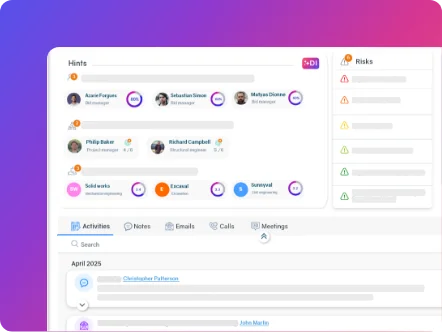
AI-powered dashboards highlight key trends instantly and turn complex project data into clear, actionable insights.

AI-powered dashboards highlight key trends instantly and turn complex project data into clear, actionable insights.
Request a demoAI-powered dashboards highlight key trends instantly and turn complex project data into clear, actionable insights.
Choosing a construction operations management platform is a major decision for firms. Operate helps operations directors and project managers centralize their data and gain visibility across every job site.
1. Does the platform centralize all of your project data?
Construction firms often work across several disconnected tools – one for bids, another for execution, a third for compliance. That fragmentation leads to duplicate data entry and limited visibility into a project’s real status.
A platform built for the AEC industry, like Operate, brings everything into a single environment. Ask the vendor directly: once data is entered, is it accessible everywhere in the system?
2. Does the software adapt to your current processes?
Some platforms impose generic processes that don’t match the operational realities of construction. You end up adapting your own methods to fit the software, instead of the other way around.
Ask for a personalized demo using your own project scenarios. Tools built for construction should recognize industry-specific contract types: progress billing, milestone billing, unit-price delivery, and time-and-materials.
3. What visibility will you have into financial performance?
Knowing a project’s financial status only at month-end isn’t good enough. Costs incurred, budgets, and margins need to update automatically as work progresses.
Effective financial management software gives you real-time visibility into the financial health of every project. Operate connects planning, budgeting, and execution in a single, unified workflow.
4. How does the platform support your field teams?
Field team adoption determines whether an implementation succeeds or fails. Test the mobile app on the devices your crew actually uses. Check load times on a weak connection.
Workforce management tools should let people log timesheets, update progress, and submit site reports in real time. The most common actions should be reachable in one or two taps from the home screen.
5. What integrations are available with your existing systems?
A new platform needs to connect with your accounting software and the tools you already use. Pay attention to the difference between two-way sync and one-way transfer – two-way sync eliminates duplicate entry and manual reconciliation.
Operate integrates natively with QuickBooks Online, Sage, and MS Project (bidirectional sync). Ask the vendor for a precise list of native integrations with your specific platforms – and be wary of any vendor who can’t tell you plainly what’s live today versus what’s on their roadmap.
6. How does the software help you identify risk?
Reactive risk identification usually comes too late. An effective platform flags potential problems before they hit your schedule or your budget.
Operate uses AI-assisted analysis to surface inefficiencies and flag opportunities. Inspections, audits, incidents, and corrective actions are linked directly to project activity rather than managed in separate apps.
7. What’s the pricing structure?
Subscription fees are only part of the total cost. Factor in implementation, training, customization, and ongoing support to understand the full cost of ownership.
Operate’s pricing is based on the number of users, not on project value – a flat monthly rate per user, with no percentage-of-revenue pricing and no hidden accounting-integration fees. That makes your software costs predictable as you grow. Deployment is included in your subscription, with teams typically operational within 48 hours – not the months-long rollout common with enterprise platforms.
The seven questions in this article give you an objective way to evaluate every vendor. Build an evaluation scorecard around these criteria before your first demo. Bring your foremen and field technicians into the testing process.
Operate offers a personalized demo where you can test the platform using your own data, contracts, and teams. A side-by-side comparison is useful – watching Operate run on your own projects is better.
Investing in operations software is a long-term commitment. Take the time to evaluate each option properly using the questions above, so you can make a decision you can defend.

Operate Expert
Our Operate experts work specifically with AEC teams. They'll show you the parts of Operate that are relevant to how you work — and be straight with you about whether it's the right fit.
If you're evaluating software, or if you're paying for a platform your teams have stopped using, it's worth 15 minutes.
Book a discovery call →Timelines vary widely across vendors, and that gap is worth understanding before you sign. Operate is deployed as part of your subscription, with teams typically up and running within 48 hours – no months-long rollout.
Prioritize document management, equipment tracking, integrated billing, and mobile access. Operate centralizes these functions into a single source of truth accessible to every team.
Invite your most experienced foreman to the demo. Their questions and feedback are often a stronger indicator of adoption success than input from office-based staff.
Generic platforms serve multiple industries with standardized processes. Operate builds every feature around the operational realities of the AEC industry, including construction-specific contract types and job site workflows.
Ask any vendor directly about their security protocols and industry certifications before you commit – don’t assume compliance without confirming it.
Whether you can migrate historical data depends on the format it’s currently in. Ask the vendor for a migration assessment, and clarify your data export rights in case you ever switch platforms.



Start simplifying your projects, aligning your teams, and making smarter decisions today.